
Search for Agents is a new Cloudflare feature that lets a website be indexed for AI agents with a single switch in the dashboard. It also supports the HTTP QUERY method, which lets agents send search queries in the request body.
Quick summary
- Search for Agents is enabled via the dashboard or API, after which Cloudflare automatically creates an AI Search instance for your zone.
- The search endpoint lives under your domain and is advertised on every page through meta tags or YAML front matter.
- The endpoint returns retrieved content as Markdown, not an AI-generated answer.
- Search for Agents supports the HTTP QUERY method, cited as RFC 10008.
- The feature is available to all customers, including Free (with limits), and is billed according to AI Search pricing.
What’s new in Search for Agents?
Previously, to offer search to agents, you had to create and configure an AI Search instance yourself, then build the integration so the endpoint was available on your domain. Search for Agents puts all of that setup behind a single switch.

When enabled for a zone, the service creates an AI Search instance, starts indexing content and exposes search on your own domain. The instance is created with default settings, and you can enable reranking or change options such as cache at any time.
How does Search for Agents work?
Search for Agents automatically builds an index for your zone and exposes APIs that any AI agent can discover and use. Everything happens at the Cloudflare network layer. The idea follows Markdown for Agents, where Cloudflare’s network converts HTML to Markdown in real time.
How do agents discover the endpoint?
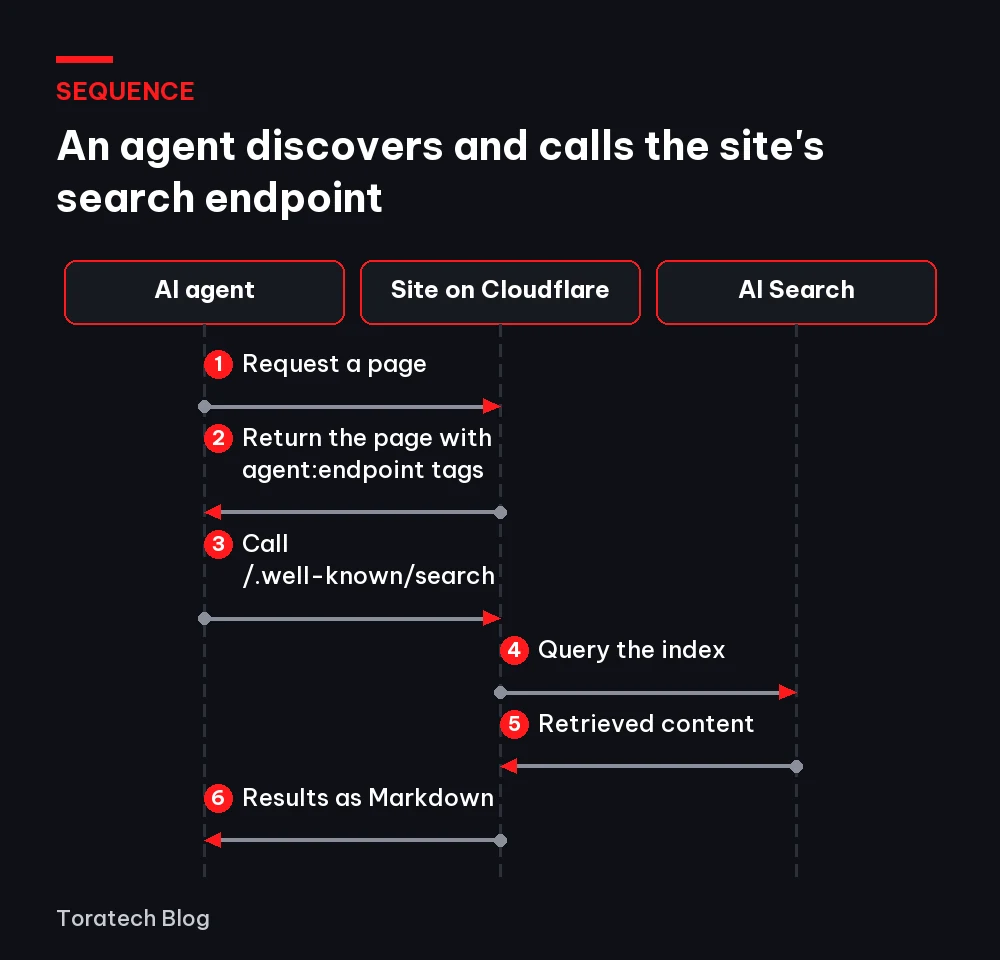
Search for Agents automatically advertises the search endpoint on every page of the site. For HTML responses, Cloudflare adds metadata to the page head.
<meta name="agent:endpoint" content="https://developers.cloudflare.com/.well-known/search?q={query}">
<meta name="agent:method" content="GET">
The two tags above are part of the metadata added to the head; Cloudflare also adds agent:instructions and agent:documentation tags. If Markdown for Agents is also enabled, agents sending Accept: text/markdown receive the same information in YAML front matter.
How do agents search the content?
Once it knows the endpoint, the agent calls it with curl using the q parameter. Depending on the AI Search configuration, agents can also ask in natural language. The result is Markdown with a score for each document.
$ curl "https://developers.cloudflare.com/.well-known/search?q=cloudflare+artifacts"The command above is an example from Cloudflare’s original post. The endpoint returns retrieved content, because the agent already has its own AI model and conversation.
What is HTTP QUERY and why does it fit?
HTTP QUERY lets a client send search criteria in the request body in a safe and idempotent way, without changing server state. Cloudflare describes it as an IETF Proposed Standard, published in June 2026 as RFC 10008. Cloudflare considers it a good fit for AI-powered search.
According to Cloudflare, adoption is under way: major browser vendors are discussing the RFC, curl and undici are adopting it, and some frameworks and other clients are discussing it. Search for Agents supports QUERY with plain text or JSON bodies.
curl -X QUERY 'https://developers.cloudflare.com/.well-known/search' \
  --header 'Content-Type: application/json' \
  --data '{"q":"How many bulk import requests per minute does Email Service allow?"}'
This command sends a question as JSON using the QUERY method.
Impact on developers
If you manage a site on Cloudflare, consider enabling Search for Agents for your zone and checking the AI Search instance that gets created. Agent access also depends on domain settings such as bot management, AI Crawl Control and WAF, so you should review these configurations.
Costs follow AI Search pricing, including indexing, storage and serving queries. You should check the limits of your current plan before enabling it. If you write a client or agent, it is worth trying to read the agent:endpoint and agent:method tags to find the endpoint on its own.
Impact assessment
| Audience | Impact | Level | What to do |
|---|---|---|---|
| Developers | Can let agents search a site without building retrieval infrastructure themselves. | Medium | Try enabling it on one zone and check the Markdown results. |
| BrSE / PM | Need to determine which parts of the client’s site agents are allowed to access. | Low | Ask the client about access policy and review bot management and WAF. |
| Managers | Costs arise according to AI Search usage. | Low | Check the Free and Paid plan limits before enabling. |
Industry perspective
In Toratech Blog’s view, this direction shows that a site can be designed for agents to read, not only for people. The opportunity is that agents find the right content without crawling every page. The risk is that your content may be retrieved by agents more often, so access configuration needs review.
In the long term, if HTTP QUERY is widely adopted, search APIs could use one standard method instead of GET with long query strings. This is a cautious assessment, and depends on adoption by browsers and frameworks.
Frequently asked questions
Is Search for Agents free?
The feature is available to all customers, including Free, but with limits. Costs follow AI Search pricing, including indexing, storage and serving queries.
Does the endpoint return AI-generated answers?
No. The endpoint returns retrieved content as Markdown. The agent uses its own model to answer the user.
Can I use QUERY instead of GET?
Yes, Search for Agents supports QUERY with plain text or JSON bodies. You need a client that supports this method, for example curl as in Cloudflare’s example.
Can agents access every site that has it enabled?
Not necessarily. Access also depends on domain settings such as bot management, AI Crawl Control and WAF configuration.
References
- Cloudflare Blog (primary source)
This article was compiled with the help of AI from the sources below.